

Format HTML data
Plain text import is the preferred method for most text data imports. However, when you have text data that requires styling, we recommend importing HTML. Text highlights, bolding, and other formatting styles are supported with HTML.
To prepare your HTML data for import, create a CSV with two fields: origin and HTML. See an example file.
Here is the list of our approved HTML tags
"b",
"body",
"br",
"div",
"em",
"h1",
"h2",
"h3",
"h4",
"h5",
"h6",
"header",
"hr",
"html",
"i",
"li",
"mark",
"ol",
"p",
"s",
"span",
"strong",
"sub",
"sup",
"u",
"ul",
Note: <html> and <body> are not accepted tags.
and also approved CSS properties
"color",
"font-size",
"font-family",
"font-weight",
"line-height"
Note: CSS styles require a semicolon at the end.
Tips
- If your text data needs linebreaks to be properly formatted, we recommend using the plaintext uploader. Select "plain text" and create a CSV that includes linebreaks. Example below:
origin,text
1,"a multiline
text snippet"
2,"a three
line
text snippet"- If your HTML snippet contains a comma, wrap the snippet in double, straight quotes. Otherwise, it will break across columns. (Spreadsheet editors like Excel and Sheets automatically wrap the contents of an entire column in quotes when converted to CSV format. If using a spreadsheet editor, there is no need to add any additional quotes around snippets that contain commas.) Example below.
origin,html
1,"<div>this is my, text snippet, with a comma</div>"
2,<div>this is my text snippet</div>- If your HTML snippet contains angle brackets (< or > signs), surround the symbols with spaces to ensure proper handling.
- For example:
<p>A drop in cells < normal was observed</p> - Two angle brackets that "close" (<>) will result in a malformed snippet.
- For example:
- If your HTML snippet contains double quotes ("like this"), you'll need to escape those characters by doubling up on the double quotes.
For example,<p>Use the ""ABCDs"" to determine lesion malignancy</p>
Entity highlights
[regular text] <mark><u><b>[highlighted text]</b></u></mark>
[regular text] <mark><u><b>[highlighted text]</b></u></mark>
[regular text]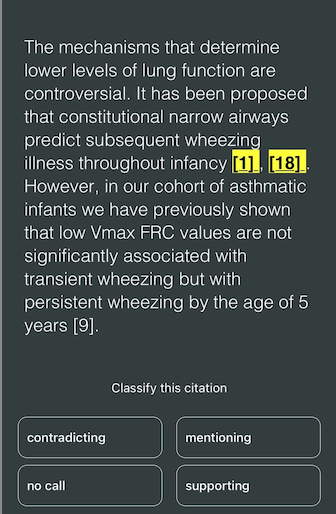
Entity Highlights: Labeler Display
You can learn more about converting plain text to highlighted html in this recipe.
Multi-paragraph text
<p>
  <b>ID:</b> [integer]
</p>
<p>
  <b>Title:</b> [insert text here]
</p>
<p>
  <b>Abstract:</b> [insert text here]
</p>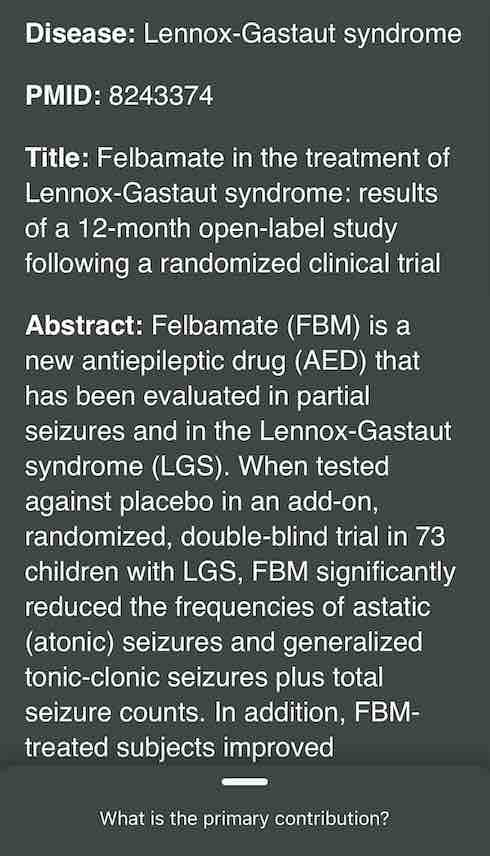
Text with Titles: Labeler Display
You can learn more about converting multi-paragraph text to HTML in this recipe
Updated about 1 year ago