

Label assignment
Every case will be assigned a labeling state. This state indicates how the case is being used, if the case requires additional review, and if the case is being used for performance measurement. See labeling state definitions here.
Here's a diagram demonstrating the journey of a case through our portal.
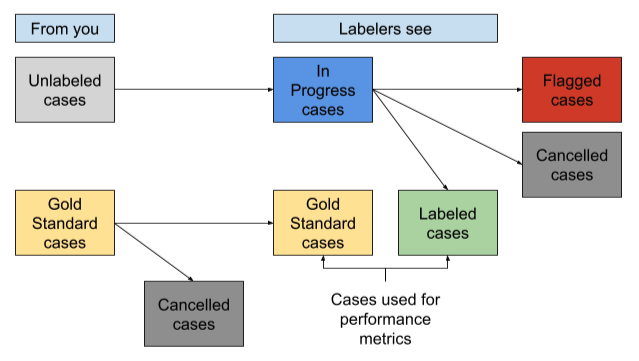
How does a case get Labeled?
A case moves from Ready or In Progress (unlabeled) to Labeled through the following process:
First, unqualified reads are filtered out. See here for how we determine qualified reads.
Then we determine the Majority Label and Correct Label, which is done differently for different tasks. See Label aggregation for additional details.
How are Gold Standard and Labeled cases (cases with answers) used?
We define Gold Standard cases and Labeled cases together as cases with answers. These cases are used in a variety of ways:
- Teaching labelers: These cases are used to teach labelers how to correctly annotate in the task. Once a labeler answers one, they will immediately see the correct answer, which will help them learn the proper annotations for future cases.
- Performance measurement: Labelers must meet a certain trailing average accuracy on these cases their reads to be counted on unlabeled cases. For example, if we set the trailing average accuracy to 80%, labelers must get 8 out of the last 10 cases with answers correct for their reads on unlabeled cases to be used.
- Continued performance incentive: Cases with answers are interspersed with unlabeled cases, so labelers are not aware whether they are answering a case with an answer or an unlabeled case. Only the top performers are paid, incentivizing them to perform well and try their best on every single case. Cases with answers are circulated to labelers until labeling is complete.
How does a case get Canceled?
A case can be cancelled either by your team on the portal, or by Centaur. A canceled case is removed circulation and is not shown to labelers. This is a good option for cases that may be low quality, contain PHI, or do not need to be labeled for any other reason.
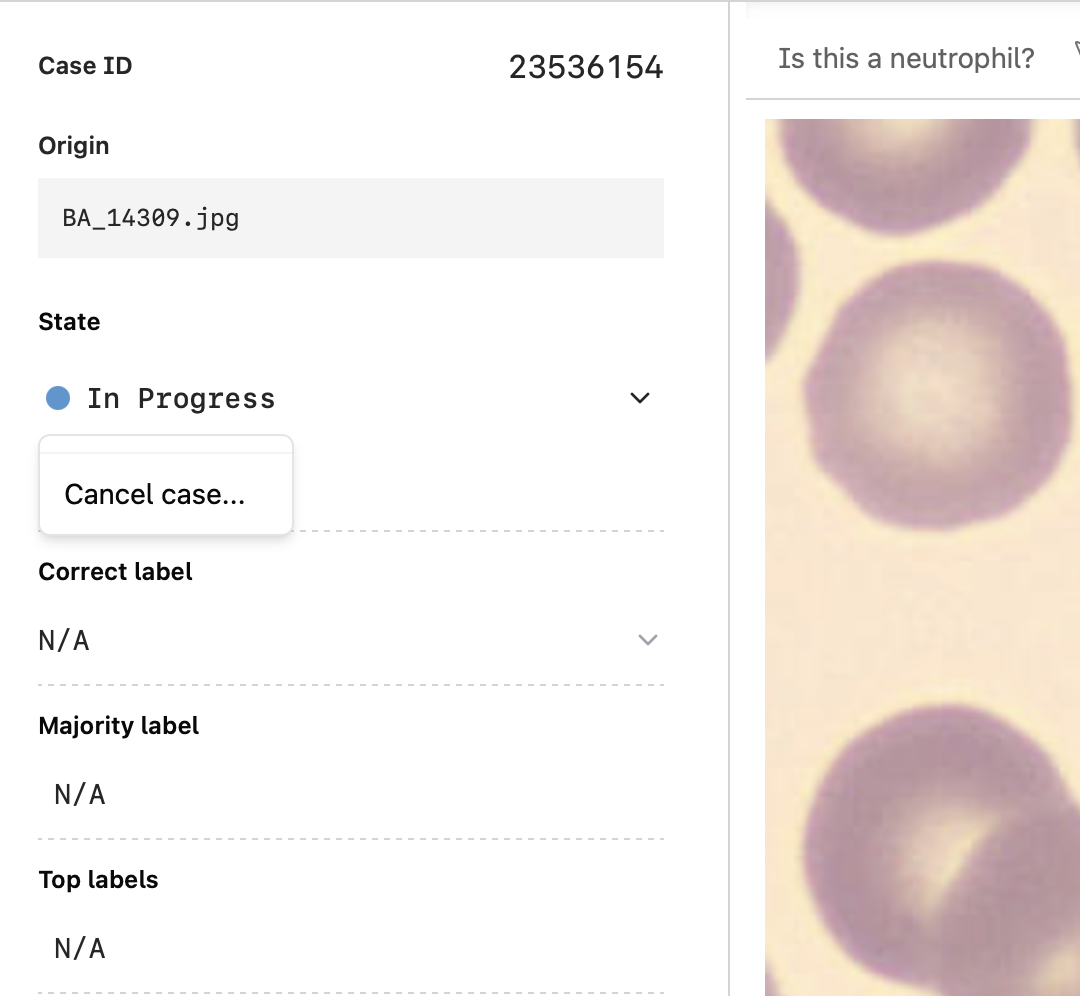
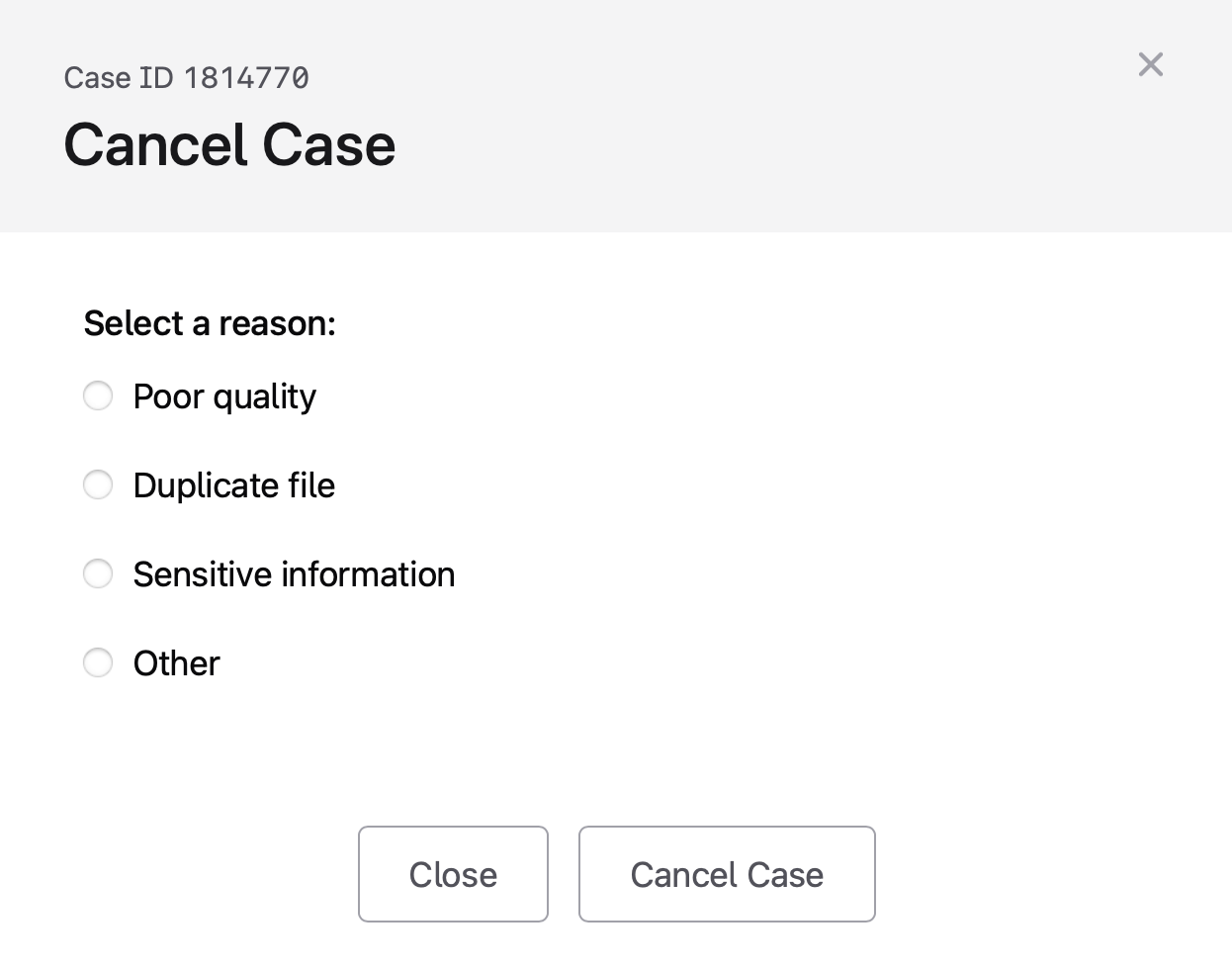
To cancel a case on the portal:
- Select the case and click the drop down arrow next to the labeling state
- In the pop-up, select your reason for canceling the case then select Cancel case
How does a case get Flagged?
Labelers can flag cases for one of three reasons:
- Incorrect: If they believe the “Correct” answer for a case is wrong
- Irrelevant: If the case is either of low quality or of data not relevant to the task
- Inappropriate: If inappropriate information, such as PHI, is included
To flag a case, labelers need to select one of the reasons and include a written explanation. After a case is flagged, it will be removed from circulation until it is manually reviewed and returned to its previous state via the portal. In some scenarios, a case may need to be flagged twice before it's removed from circulation.
You can filter for flagged states by selecting the Cases tab then selecting States at the top of the screen. Choose Flagged to filter for flagged cases.
To review a flagged case, select the flagged case. Then select the comment icon on the right hand of the screen to view the reason the case was flagged. Once you have reviewed the case, select the dropdown arrow next to State to:
- Return the case to its last labeling state
- Cancel the case
Alternatively, you can update the case to a Gold Standard by editing the Correct Label.
Updated about 1 year ago